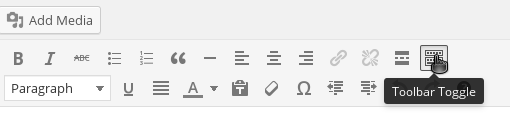
The WordPress visual editor may show as a single line of icons. A click of a mouse button will restore the missing second row of icons.

Two lines of icons provide the visual editor with its full default capability.
The normal view of the visual editor has two rows of icons, as shown in the image below.

The first row of icons in the visual editor are related to formatting of the text: whether its bold; left or right justified and adding links to other pages on the site or elsewhere on the Internet.
The missing second row of icons allow the paragraph style to be set and includes a number of miscellaneous items such as indents, text colour and importing of text content.
To restore the missing second row of icons to the WordPress visual editor click on the Toggle Toolbar at the end of the top row