Having published a new WordPress page, the page doesn’t appear in the menu.
Looking for help to show a missing, newly published, web page may be resolved by reviewing the configuration of the admin menu page.
Often WordPress websites use a custom menu to govern the pages to be presented. Not all pages, for example the Terms of Use, Privacy Policy, are wanted in the menu, providing clutter to a lean navigation.
Making changes to the menu is easier with two tabs open in your browser; one to make the edit; and one viewing the presentation view of the website.
Navigate to the admin page Appearance > Menu.
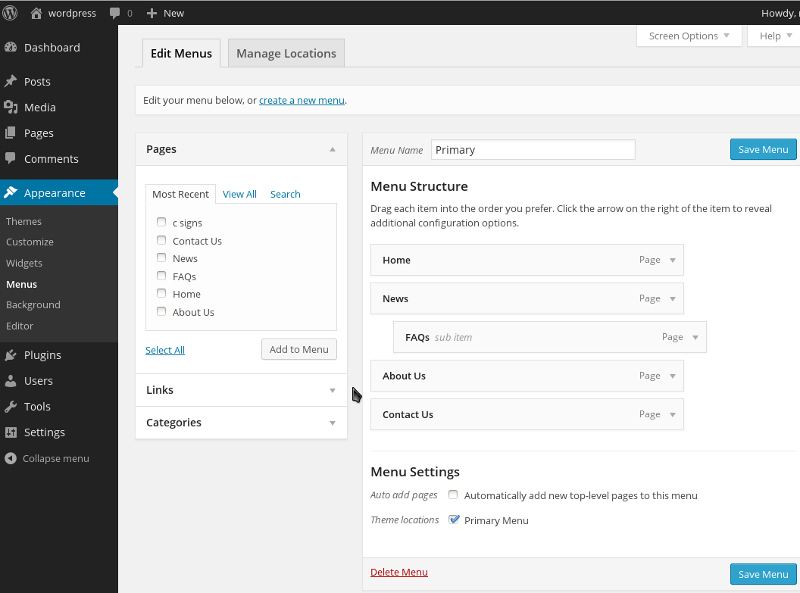
In the narrow column are listed pages and other items which may be included in the menu.
The large section shows the structure for a named menu.
A second tab at the top Manage Locations, assigns named menus to theme named menu locations.
Page List
Review the page list to ensure that your page has been published. Has it been given the correct date – maybe its scheduled for a date in the future.
If your page is not shown in the Most Recent list click on View All, just to be sure.
Menu Location
On this tab the Theme Location and the selection of the Assigned Menu are shown
Menu Structure
Given the menu is otherwise working the association of the menu to a named placement is likely to be correct.
Typically a website only has a single main menu for navigation. Additional menus maybe included in the footer or at the side of the website to show a group of pages.
When reviewing the menu structure ensure that you do this for the correctly named menu. Take a look at the Manage Locations tab to see the relationship between Theme Location and Assigned Menu.
If your newly published web page is missing from the Menu Structure it will need adding. To do so select it in the page list and click on Add to Menu. The page will be shown at the bottom of the menu structure, drag it higher up the list to the position where you wish it to appear.
The page position, regards its parent page should match the permalink value. the parent page in the menu should be included as a parent page when edit the page permalink value and parent page drop down list.


