Email configuration options allow emails to be collated and forwarded to one or more email accounts.
Login to your domain control panel to see what email options you have available.
A number of email configuration options maybe available to a domain. These enable
Email configuration options allow s email to be
Configuring a domains email options
Email Forwarding

Forwarding of email allows for email addressed to a given email account is routed through to one or more email addresses. This maybe within the same domain name or to another service, for example a Gmail or Outlook account.
Multiple publicised email address: sales@; accounts@; admin@ and support@ can all be directed to the same email address. An email arriving to any one of these configured email forwarding addresses will be delivered to the designated email address.
Simplify the number of email addresses to be configured in your email client with email forwarding and common business email addresses publicly available.
Email forwarding allows for an email address to be publicised, for example sales@. The email can be forwarded to all appropriate email user accounts. The email address is generic as opposed to specific to a person. The configured recipients of the forwarded emails can then be modified as the people in the role change.
Catch-all Forwarding
Catch-all forwarding enables email sent to any address at a domain to be redirected to a given email address. This may be an address within the domain, or another domain.

Catch-all forwarding enables email which has been miss-spelt or misunderstood to be caught. It will ensure that email sent to sales, sale, admin, accounts etc are all caught and handled.
The catch all will be implemented on emails received where no other configuration matches.
Whilst all email variations are caught and handled catch-all email forwarding does allow for the receipt of spam email delivered to numerous email variations at the domain. Its use can increase the level of spam which you receive.
To highlight the fact that an email has been caught by the catch all you may wish to create a specific email address. Emails can then be reviewed with knowledge that it has been sent to an unpublicised email address.
Wild Card Forwarding
Similar to catch-all forwarding wild card forwarding passes email sent to a specific email address at the given domain to the same prefix at a second domain.
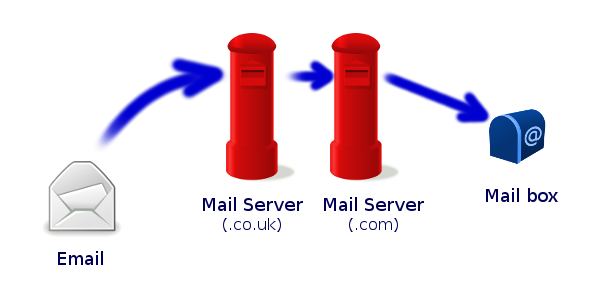
A good use of wild card forwarding is passing email from a .co.uk domain to a .com domain. For example
sales@mydomain.co.uk –> sales@mydomain.com
Send Only Addresses
Send only email addresses are a functional address. The address allows the email sending operation to work. for example an email sent from a website contact form.
The email template for the different features of a website: new user; forgotten email address; contact form, can each include the requisite email address for further contact.
Autoresponders
An autoresponder can be configured to send an automated response on the receipt of an email to a given address.
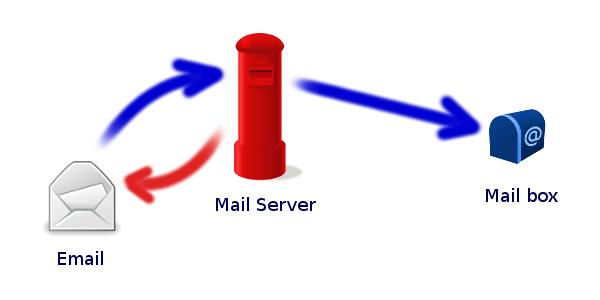
Autoresponder email configuration typically has a subject, a body content and an active period.
The autosponder may be used to advise out of office, perhaps a change of email address or to thank the emailer for their enquiry.


