Banners may be used for advertising on your web site. The DotNetNuke banner module works in conjunction with the banner configurations which have been made against the vendors accessed through the Vendors tab under the admin menu.
To begin we require a banner definition.
For this article the main items of interest are:

Our next step is to return to the page upon which we want a banner.
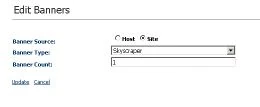
Insert the banner module, and select the edit option.
For our exercise we are going to source this banner from those on this host (our web site).
Now hopeful you have remembered what type of banner style you set previously. Select this option here.
Finally select how many banners are to be shown.
If you have selected more than one banner you will need to return to the vendors and and some more definitions.
Banners are able to provide details of the number of click through and a start and end date for the showing of a particular banner can be defined. This is under the vendors tab.


